
Step 1 — Download & extract
Click the download button above to grab the Spotnet archive. It comes as a .rar file — right-click it and extract with a tool like 7-Zip or WinRAR into a folder of your choice (for example C:\Spotnet\). There’s no installer; Spotnet just runs from the extracted folder.
Step 2 — Launch Spotnet
Open the folder you extracted to and double-click Spotnet.exe. On the very first launch Windows may show a SmartScreen warning — click "More info" → "Run anyway". Spotnet is safe; it just isn’t signed by a major publisher.
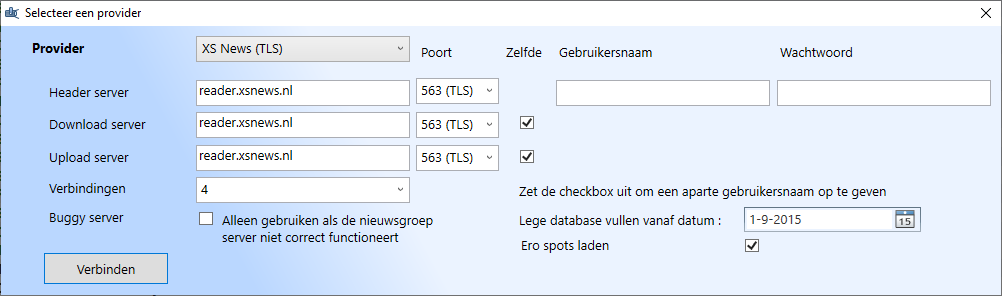
Step 3 — Configure the server
In Spotnet, open the menu Settings (or the gear icon) and find the Servers tab. Add a new server with these details:
- Provider: XS News (TLS)
- Server / Host:
reader.xsnews.nl - Port:
563 - Username and Password: from your welcome e-mail
- Maximum connections: set to your plan’s allowed connection count
Click Connect. Spotnet will test the connection. A green status indicator means you’re online.
Step 4 — Load the spots database
Spotnet’s killer feature is the built-in community indexer (called “spots”). On first launch it offers to download the spots database — accept this and let it finish. You can pick how far back in time to load; everything from 2015 onwards usually takes only a few minutes.
Step 5 — Find and download
The main window now lists thousands of spots, grouped by category (movies, music, software, etc.). Use the search bar to find what you’re looking for. Click a spot to see details; click Download to queue it. Files are downloaded, repaired (PAR2) and unpacked automatically into Spotnet’s download folder.
Troubleshooting
- "Authentication failed" — double-check your username and password. Copy & paste from the welcome e-mail rather than typing manually.
- Connection works but no spots load — make sure the spots database has finished downloading; this can take a few minutes on the first run.
- Slow downloads — increase the connection count in Settings → Servers (up to your plan limit) and confirm SSL is enabled on port 563.
- Adult content showing in results — uncheck the “Load Ero spots” option in settings to hide it.
Still stuck? Contact support →
