
Step 1 — Download & install
Go to shemes.com and download the GrabIt installer. Run the .exe — it’s a standard Windows installer. Accept the defaults; finished setup drops a shortcut on your desktop and into the Start menu.
Step 2 — Open the server settings
Launch GrabIt. The first time you open it, the New Server Wizard usually appears. If not, open it manually via Tools → Options → Servers and click New.
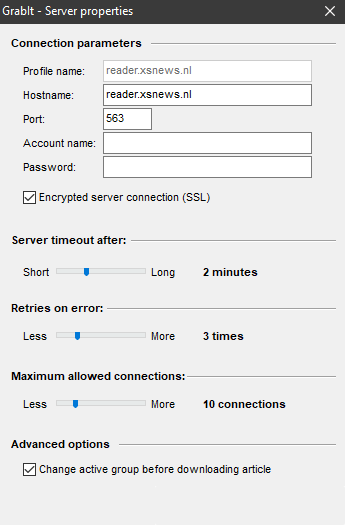
Step 3 — Enter the values
Fill in the wizard / Server dialog with the values above. Make sure to tick "Use secure connection (SSL)" so the port automatically jumps to 563. Set the connection count to match what your XS News plan allows (e.g. 100 on Unlimited).
Click OK — GrabIt will test the login. A green status (or no error) means you’re online.
Step 4 — Download the group list
On first connection, GrabIt offers to download the list of available newsgroups (100.000+ on XS News). Accept this — it takes a couple of minutes. Once finished, you can browse, search and subscribe to groups from the main window.
Step 5 — Working with NZB files
For binary downloads, the quickest path is via NZB. Find a release on your favourite indexer, download the .nzb, then in GrabIt go to File → Open NZB (or drag-and-drop). GrabIt queues the parts, downloads them through XS News and writes them to your download folder.
Run a PAR2 repair tool (such as QuickPar or MultiPar) on the downloaded set to verify completeness. GrabIt itself doesn’t auto-repair, which is part of its hands-on philosophy.
Troubleshooting
- "Authentication failed" — copy & paste credentials from the welcome e-mail. Make sure SSL is on and port is 563.
- Group list never finishes downloading — cancel and retry; sometimes the first run hits a hiccup with such a large list.
- Slow speed — increase the connection count in Tools → Options → Servers.
- Broken downloads — GrabIt doesn’t repair automatically. Run PAR2 manually with QuickPar/MultiPar to fix missing pieces.
Still stuck? Contact support →
